Back to Customer
Care Index
Free Shipping is Twice as Nice at SmartPak!
All orders over $75 and all SmartPaks over $40 always ship free.
At SmartPak, we get you because we are you - real riders who want to take the best care of our horses (and dogs!). When it comes to online shopping, you'd rather spend your money on your horse and yourself, not shipping and handling. When you shop at SmartPak, you can do just that.
You'll automatically qualify for free ground shipping if:
Your order total is over $75
- or -
Your order contains a SmartPak over $40
(Orders must be shipping together on the same day to the same address)
No codes, no exclusions. Just free, every day.
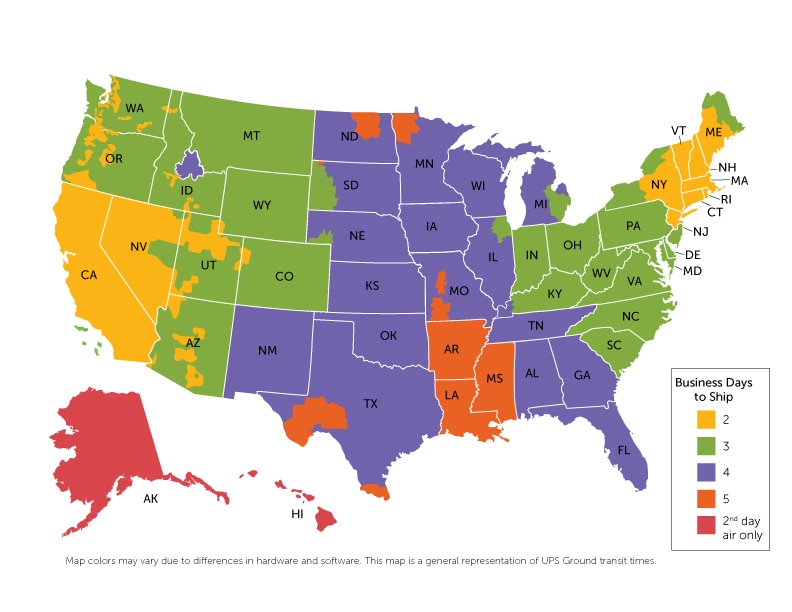
Please note: The map above is based off of estimated UPS ground shipping times and is not a guaranteed delivery schedule. A small portion of orders will ship via USPS, which may add an additional 1-2 business days to delivery times. For complete details, please call 1-888-752-5171 and we'll happily explain our delivery times, talk about horses or sing you a song - totally up to you!
Ship it to the Barn
The ultimate peace of mind is more convenient than ever when you ship your horse's SmartPaks straight to the barn! Shipping to a barn address entitles you to great benefits, from free embroidery to discounted shipping. For details, visit SmartPak.com/Barns or call 1-888-752-5171.
Flat-Rate Shipping
If your order doesn't meet either of our free shipping options, you'll still only pay flat-rate $7.95 ground shipping (it's not free, but it's one of the best rates around). We never charge F.O.B. or overweight surcharges. To qualify for flat-rate shipping orders must be shipped within the continental US. Orders to Alaska and Hawaii ship via 2nd Day Air. For pricing information, call 1-888-752-5171 or proceed to the first step of the checkout process.
Expedited Shipping »
Expedited shipping is available for all in stock items. Expedited shipping may be
available for items that are on backorder when they are received by us. For more
information on this, please call us. Your expedited order may be shipped by UPS.
Prices are figured using the current UPS rate based on the weight of the order.
Orders placed by 2 pm EST Monday - Friday will be shipped out the same day, pending
credit card authorization. Any order placed after 2 pm EST Monday - Friday will
be shipped the next business day. Orders placed over a weekend will be shipped the
following business day. Delivery times do not include weekend days or holidays.
Saturday deliveries are available in some areas for an increased shipping charge
with Next Day Air shipping only. If interested in a Saturday delivery, please contact
us at . All other expedited shipping methods
can be selected on our website.
For all expedited deliveries UPS is responsible for delivering the package on time.
Certain circumstances can arise where UPS is unable to deliver expedites on time
due to weather, remoteness of location, etc. All efforts will be made by SmartPak
to ensure that packages arrive on time as ordered, but we cannot guarantee that
UPS will always act accordingly. In particular, orders indicated for Saturday delivery
cannot be guaranteed.
We strongly recommend that if the order is for a particular health emergency, customers
should seek immediate assistance from their vet. If a UPS expedited delivery fails
to arrive on time as ordered, SmartPak will refund the additional shipping charges
incurred.
Order Delivery »
All orders are shipped within one business day (no orders are shipped on Saturday or Sunday so any order placed after 2 pm EST on Friday will ship on Monday). Shipping times depend on your location and the delivery method selected. For estimated ground shipping times, please consult the map above. To track an order that's already in transit, click on My Account in the upper right hand corner of the website, then select the "Order Tracking and Shipment History" link in the "Orders" section.
Shipping Outside the United States »
Currently we are unable to ship anywhere outside of the United States. We're working on making international shipping a possibility in the future, and we hope that you will continue to check in with us.
Shipping to Multiple Addresses »
You can set up multiple shipping addresses during the checkout process. You can choose a different shipping address for every person or pet in your account. You can update your shipping addresses at any time by accessing the "My Account" link in the upper right hand corner of the website, then selecting the "Shipping Address(es)" link in the "Settings" section. Find the order you'd like to change, then select "New Address" from the drop down menu. Enter the new shipping information, then click "Add." Once the page refreshes, you'll see the new address listed next to the order and you're done! For orders on AutoShip, make sure that you change the address before the Change-by Date printed on your packing slip.
Sending a Gift »
When you're setting up your shipping address just check off the "this is a gift" box and you will be prompted to enter a custom gift message. Not sure where you set up your shipping addresses? If this is your first order, you will be prompted to enter shipping information as part of the checkout process. If you're a returning customer you can click on "My Account" in the upper right hand corner of the website, then select the "Shipping Address(es)" link in the "Settings" section. Any group of items marked as a gift will not have any pricing information displayed on the packing slips.
AutoShip Orders
SmartPaks Billing and Shipping Schedule »
Part of the peace of mind that comes with SmartPaks is knowing that you'll never run out. You'll receive a new supply of SmartPaks every 28 days so your horse or dog will always have fresh, accurately dosed supplements. Because it takes time to carefully build your horse's custom SmartPaks, we bill your account 1 week in advance of your shipping date to guarantee on-time delivery. Your supplements are now on cruise control, but you're still at the wheel! You can adjust your shipments anytime before the change-by date printed on your packing slip. If you lose the slip, don't worry - we'll also email you a reminder every month.
Changing Your Shipping Schedule »
Need to delay your SmartPaks for awhile or have them ship right away? No problem! Start by clicking the "My Cart" link in the upper right hand corner of the website, then scrolling down to "Existing Orders" to find your horse's SmartPaks. Under your horse's name, select the "Change Ship Dates" link, and you'll be redirected to the SmartPaks Scheduler. You can then use the Scheduler to select a specific shipping date or delay for a specific amount of time. You can also use our calculator to adjust your shipping date based on the number of SmartPaks you currently have. Then click "Confirm Changes" and you're all set!
Ship Together and Save! »
You can always add additional items to ship free along with your AutoShip order, whether it's a one time order of a new bridle or AutoShip SmartPaks for a new horse. There are two ways to synch your orders up on the same shipping schedule. The first way starts on the product page, when you're about to add the item to your cart. Under the "Where To?" section, just above the "Add to Cart" button, you'll find two options for "Choose Ship Date." You'll want to select "Earn FREE Ground Shipping when you add this to your order for," then choose your AutoShip order from the drop-down menu. The second way starts when you've already added your items to your shopping cart, but the dates don't match your AutoShip order. Start by clicking the "My Cart" link in the upper right hand corner of the website, then scrolling down to the order you wish to change. Under "Availability," click the link that says "Change Ship Dates." This will take you to the SmartPaks Scheduler where you can synch your orders up. Find the order you want to adjust and click "Adjust Shipping Date." Then use the calender view to look for your other AutoShip orders (highlighted in blue). Select the order you'd like to synch with and click "Confirm Changes." All that's left to do is go back to your cart and proceed through the checkout process!
Updating Your AutoShip Address »
You can update your shipping addresses at any time by accessing the "My Account" link in the upper right hand corner of the website, then selecting the "Shipping Address(es)" link in the "Settings" section. Find the order you'd like to change, then select "New Address" from the drop down menu. Enter the new shipping information, then click "Add." Once the page refreshes, you'll see the new address listed next to the order and you're done! For orders on AutoShip, make sure that you change the address before the Change-by Date printed on your packing slip. This is the date on which your order will be processed and any changes made on or after this date will not take effect until the following shipment.